Cycle Recording Explained: How Loop Recording Works in a DAW
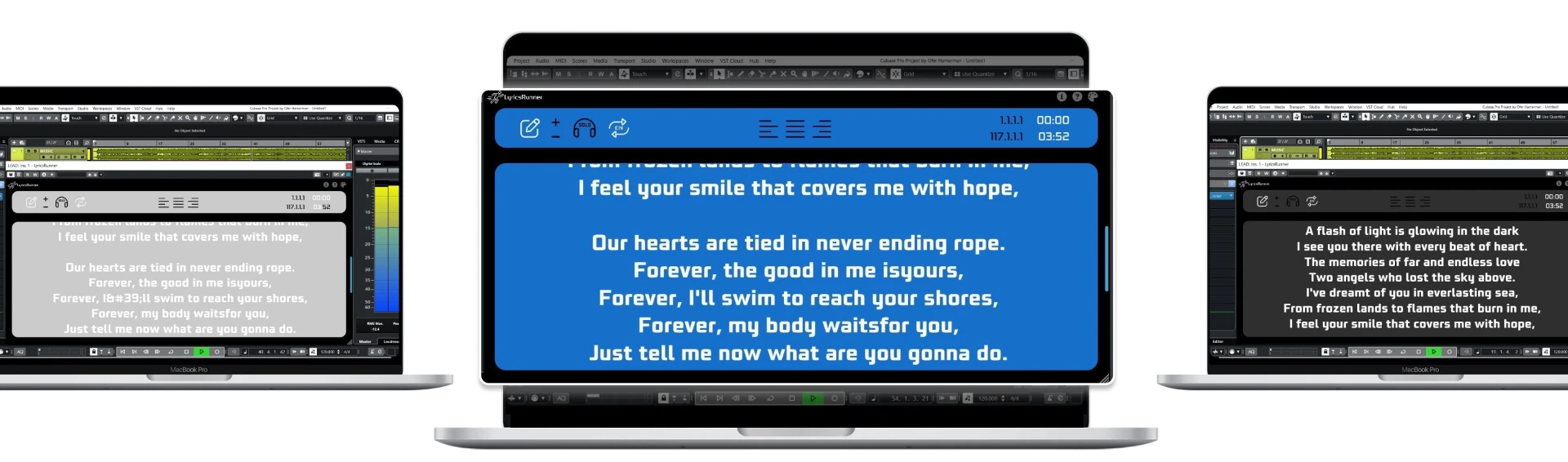
Cycle recording — also called loop recording — is a DAW mode where a marked section of the song plays in a loop and records a new take on every pass. The singer keeps singing, the engineer keeps listening, and the DAW quietly stacks each pass so nothing is lost. It is the standard way to capture vocal takes, and it pairs naturally with comping, where the best moments of each pass are combined into one final performance.
What 'cycle record' actually means
When you enable cycle recording and press record, the playhead runs from the loop start to the loop end, jumps back, and records again — automatically. Each lap creates a separate take (sometimes shown as lanes or layers under the track). You never touch the transport between passes, which keeps the singer in the zone instead of waiting for the engineer to stop, rewind, and arm again.
How to set it up
- Mark the loop range around the section you want — a verse, a chorus, or a single tricky line.
- Enable your DAW's cycle/loop record mode (in Cubase it is literally called Cycle Record; Logic, Studio One, Reaper and others have equivalent loop-record modes).
- Give the singer a count-in or pre-roll so the first phrase never starts cold.
- Record as many passes as you need, then stop and review the stacked takes.
Why it works so well for vocals
Vocal performances improve with repetition — the third or fourth pass is often where the phrasing relaxes. Cycle recording removes the friction between passes, so the singer stays warmed up and in character. It also makes comping painless: because every pass covers the exact same bars, you can audition take 2's first line against take 4's without any timing surgery.
Keep the lyrics in sync while looping
One practical problem: when the playhead jumps back to the loop start, a static lyric sheet or a manually scrolled prompter suddenly shows the wrong part of the song. LyricsRunnerVST solves this because it follows the DAW playhead — when the cycle jumps back, the lyrics jump back too, and the singer always sees the line they are about to sing. That alone saves the constant 'wait, where are we?' between takes.
LyricsRunnerVST runs as VST3, AU and AAX in every major DAW. There is a 14-day free trial with no credit card, and the lifetime license is a one-time $79. For more on tightening up vocal sessions, read our punch-in checklist at /blog/scrolling-lyrics-plugin-vocal-punch-ins.
Try it yourself
Ready to transform your sessions?
Drop your email — we'll send the 14-day trial download link to your inbox. No credit card.
- 30-day money-back guarantee
- Instant download
- Works in every major DAW