How to Tune Vocals Without Making Your Voice Sound Robotic
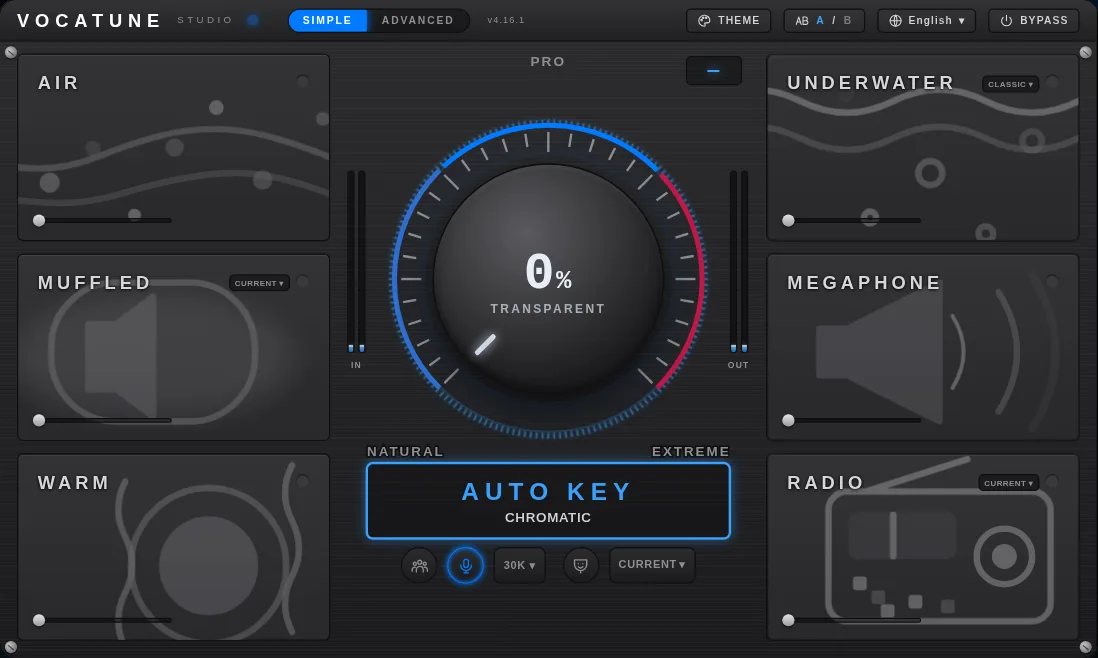
If you like the emotion in a vocal but hear a few notes that need help, do not begin by forcing the whole performance into the strongest correction setting. Start with the intended key, a gentle correction amount and a short comparison against bypass. VocaTune Studio is one option for that workflow, with a single Amount control spanning Natural, Pro and Extreme zones. Whether it fits depends on your recording, your sound and your actual setup—not a promise of an invisible result.
What does “natural” mean for this song?
Natural is not a universal preset. In one arrangement you may want to preserve a slide into a note, the width of a held-note vibrato or a deliberately loose phrase. In another, an obvious hard-retune effect may be part of the production. Decide which gestures carry the performance before you process it. If a phrase already does what you want, stronger correction may change the very detail you meant to keep.
Listen in the arrangement as well as solo. The vocal that looks imperfect on a pitch display may fit the music, while a corrected note can still sound wrong against the harmony. Describe the problem in plain terms: one landing note, a sustained note or a repeated phrase. That gives you a smaller, more useful task than trying to make every moment perfectly centered.
Check the key and scale before changing the Amount
Pitch correction uses musical targets. If those targets are wrong, increasing correction can move intentional notes toward the wrong place. VocaTune includes AUTO KEY detection of key and scale, but automatic detection is not a substitute for checking the song. Confirm the detected context against the harmony and pay attention to passages whose notes do not behave as expected.
Keep an unprocessed copy of the recording. Choose a phrase that contains both a sustained note and a transition so you can hear what the tool does between notes, not just on the center of one pitch. When a result sounds odd, first check the source performance and musical target. Repeatedly increasing correction without understanding the target can make the wrong change more obvious.
Use the Amount zones as starting points, not guarantees
Your session, your decision
Is this the right tool for you?
The documented VocaTune zones are Natural at 0–50%, Pro at 50–95%, and Extreme at 95–100%, where retuning becomes instant. Begin gently for a restrained result, then increase only as far as the arrangement needs. The names describe control ranges; they do not certify that everything below 50% is inaudible or that everything above it is unsuitable.
- Bypass first: listen to the phrase and name the note or transition that needs attention.
- Try a gentle Amount setting with the intended key and scale.
- Compare vibrato, slides and held notes rather than only asking whether the pitch is centered.
- Listen in the mix, then return to bypass to check whether the change actually helps.
- If a deliberate hard-retune sound is the goal, evaluate the Extreme zone as a creative effect instead of calling it natural correction.
Why does the vocal still sound rough after tuning?
Pitch is only one part of the recording. Harsh consonants, breath noise, clipping, plosives, room reflections and inconsistent level are separate problems. A correction plugin is not a replacement for a usable take or a complete vocal mix. If your main complaint is a harsh S sound or a noisy room, choose the relevant recording or cleanup step before purchasing a pitch processor.
For monitoring, VocaTune offers LIVE mode, but comfort depends on the complete signal chain. Your interface, buffer, host and other processing affect total delay. Test the actual chain you intend to sing through. Do not treat a stated plugin latency as proof of the whole round trip, and do not assume a good playback result guarantees a comfortable live session.
How to decide whether VocaTune fits your workflow
The desktop catalog lists macOS VST3/AU and Windows VST3. Confirm your exact installer and host before paying. A browser workflow is separate from a desktop plugin license. If you want detailed phrase-by-phrase editing, compare that requirement against the documented controls rather than assuming that every tuning tool provides the same editor.
A useful evaluation ends with a decision, not a stronger preset: can you make the change you wanted while keeping the details you care about? If yes, review current availability, trial access and the named products in the offer. If not, a different workflow may be a better choice. Request a VocaTune trial before committing; the request flow shows download availability and this guide does not promise an instant installer.
Further reading
For selective correction and preparing a performance before processing, see Sound On Sound: Creative Pitch Processing. For a general explanation of retune speed and pitch movement, see Sweetwater retune-speed guidance. These references explain tuning practice, not measured VocaTune results.
Clear answers. No pressure.
Before you decide
Will pitch correction make my voice sound robotic?
It can, especially when an obvious hard-retune sound is the goal. VocaTune's Amount control covers Natural, Pro and Extreme zones. Start gently and compare slides, vibrato and held notes with bypass. No setting guarantees an invisible result for every performance.
Can I trust automatic key detection without listening?
AUTO KEY detects key and scale, but check its choice against the song's harmony. A wrong musical target can change intentional notes. If you are unsure, confirm the key before increasing correction.
Does LIVE mode guarantee comfortable monitoring?
No. The total delay also depends on your interface, buffer, host and the rest of the signal chain. Test the actual monitoring setup rather than treating a plugin latency figure as the whole round trip.
Will tuning fix noise, harsh S sounds or a poor recording?
Pitch correction is not a substitute for a clean take, sensible microphone placement or vocal cleanup. Address the problem you hear: noise, plosives, level and pitch are different tasks.
Which version should I check before paying?
The desktop catalog lists macOS VST3/AU and Windows VST3. The browser workflow is separate. Confirm installer availability and your exact host; do not assume a browser plan includes the desktop plugin or that a bundle includes every upcoming product.
Keep the performance. Check the tuning.
Check your own song and setup first. Then review the current products, license duration and availability before paying.
Trial download availability is shown after your request. No instant-download promise.