How to Read Lyrics While Recording Without Losing Your Place
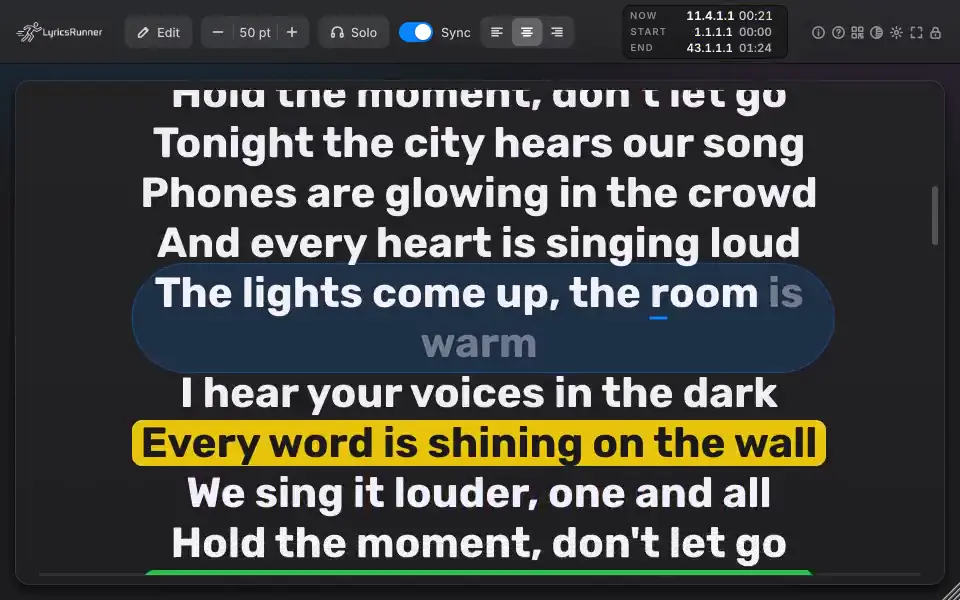
If you keep losing your place while recording, start by changing how you see the words—not by assuming you need to buy another plugin. A readable lyric sheet may solve the problem. If you also need lyrics inside the DAW, karaoke presentation or setlist changes, a dedicated teleprompter such as LyricsRunner 2 is worth evaluating. The right question is not whether it has more features; it is whether it removes the interruption that matters in your next session.
Why does a familiar song become harder to read in the booth?
During a take you are handling several tasks: phrasing, breath, timing, listening and the words themselves. A small screen, dense paragraph or awkward page change adds another task. That does not prove a medical or psychological problem, and it does not mean software will improve your singing. Treat the display as part of the recording setup. Make the next line easy to find, then listen to whether the performance feels less interrupted.
Can a phone or a printed lyric sheet be enough?
Yes. For one short song with familiar words, a static document may be all you need. Put it where you can read without repeatedly looking down, break the text into phrases and keep verse and chorus labels visible. Check the longest line at the actual reading distance. If a phone needs repeated scrolling or a sheet requires a noisy page turn, try a larger display before deciding that the only answer is a new product.
Keep the microphone position sensible when moving the display. A comfortable screen should not tempt you to turn away from the microphone on every phrase. Record a short comparison rather than judging only while looking at the screen. Basic recording problems such as clipping, room noise and plosives still need their own attention; a lyric display does not repair them.
When does an in-DAW lyrics teleprompter make sense?
LyricsRunner 2 is relevant when you want lyric presentation alongside your session rather than a separate document. Its current description includes karaoke modes, private stage notes, breath marks, mirror mode and offline vocal following. These are different workflows, not a promise that every singer needs all of them. Select the one that matches your task: reading in the booth, preparing a show or presenting words to an audience.
Your session, your decision
Is this the right tool for you?
- For recording: check phrase layout, reading distance and what happens when you stop and restart a take.
- For a setlist: check song changes and the next-song information using your real session arrangement.
- For audience phones: check the QR destination and local Wi-Fi in the intended space.
- For offline vocal following: test held notes, quiet passages and your own delivery; do not assume every arrangement follows perfectly.
A useful test before choosing a license
Use a verse and chorus from your own song. First record or rehearse with your current document. Note where you lose your place or need to touch the screen. Then set up the teleprompter with text you can read from the same position. Run a normal take, stop halfway through, restart and try a quiet passage. Compare the interruption you care about, not a general impression that the interface looks more advanced.
For a show, do the test with the intended display and network rather than only at your desk. Offline vocal following runs on the computer without uploading the vocal; that does not make the audience phone page independent of Wi-Fi. If sharing lyrics or importing material, use content you are entitled to use. A successful demo is useful evidence for your setup, not a guarantee for every venue.
Which product and format should I choose?
The desktop catalog lists macOS VST3, AU, CLAP and Standalone, and Windows VST3, CLAP and Standalone. Check the actual installer, operating system and host version. LyricsRunner Web is a separate browser lyric-video editor, not the desktop teleprompter license. Classic and LyricsRunner 2 are also different versions: having Classic does not automatically establish an upgrade entitlement.
If the main problem is pitch, noise or uneven level, choose a tool for that task instead. If your static sheet works, keep it. If your test shows that lyric presentation is the interruption worth solving, request the LyricsRunner 2 trial and review the current license or bundle. Trial download availability is shown in the request flow; this article does not promise immediate installer access.
Further reading
For recording fundamentals, see Tape Op: Top 12 Vocal Recording Mistakes. For an example of keeping lyrics inside a recording app, see BandLab vocal recording guidance. These are general workflow references, not endorsements or tests of LyricsRunner 2.
Clear answers. No pressure.
Before you decide
Do I need a plugin if a lyric sheet already works?
Not necessarily. A document may be enough for static words. LyricsRunner 2 becomes relevant when you want an in-DAW prompter, karaoke presentation or a setlist workflow. Test whether those solve a real interruption in your session before buying.
Will it work in my exact recording setup?
The catalog lists macOS VST3, AU, CLAP and Standalone; Windows VST3, CLAP and Standalone. A listed format is not proof for every host version. Check your operating system, host and installer, then test stop, restart and a quiet section in a real song.
Will it fix my singing or write the lyrics for me?
No. Its core job is presenting lyrics, not pitch correction or songwriting. Offline vocal following highlights words as you sing, but it is not a promise that every performance or arrangement will be tracked perfectly.
Does offline vocal following mean phones work without Wi-Fi?
No. Offline vocal following runs on your computer without uploading the vocal. The audience phone page uses your local Wi-Fi; test that connection where you intend to perform.
Does my Classic license automatically include LyricsRunner 2?
Do not assume so. Classic and LyricsRunner 2 are different versions and can be installed side by side. Check the specific purchase or upgrade terms; existing Classic customer access is unchanged.
What exactly am I buying: a plugin or the browser editor?
These are separate products. Desktop annual and lifetime plans have different license durations. LyricsRunner Web is the browser lyric-video editor, not a desktop license. Review the named products, duration and current availability on the offer before checkout.
Put your next song in view
Check your own song and setup first. Then review the current products, license duration and availability before paying.
Trial download availability is shown after your request. No instant-download promise.