Why Singers Forget Lyrics in the Booth (And the Fix That Actually Sticks)
Every engineer has watched this happen. The singer nails the scratch take at 11pm with a beer in hand, humming half the words. Next session you're actually recording, everybody's paying attention, and suddenly they're eating the second line of verse two like they've never heard the song before. Somebody says "just take a sec" and you both pretend it's fine. Twenty minutes gone.
The default explanation is "they didn't learn it well enough." That's almost never the real story. Singers who forget lyrics in the booth are usually the ones doing the most work at once — and running out of room to do it.
Short version: it's bandwidth, not memory
Working memory — the mental scratchpad you use to hold something while you're doing something else with it — is famously small. The classic research puts it around a handful of items at a time, and modern estimates are even stingier: roughly three to five chunks for most people under pressure. That's the whole budget.
Now count what a singer is spending it on during a real take:
- The next line of lyrics (and the line after it, so the phrasing lands)
- Pitch, against a headphone mix that's never quite right
- Timing — where the vocal sits against a beat that may or may not be quantised
- Breath planning, which has to happen a full bar before you need the air
- Tone and character: are we doing the airy version or the chesty version
- Self-monitoring, i.e. was that last note good, plus the producer's face in the glass
That's six jobs on a three-to-five slot budget. Something gets dropped, and lyrics are the first thing to go, because everything else is muscle memory and lyrics are retrieval. Retrieval is the expensive one.
“Nobody forgets how to breathe under pressure. They forget words, because words are the only thing on that list that has to be actively pulled from storage in real time.”
Why it happens more in the studio than in your bedroom
You know the song cold at home. Then the booth changes three things at once.
1. The cues you learned with are gone
When you rehearse, you're not recalling lyrics from nothing — you're riding cues. The guitar chord change, the room, your own body movement, the way you always pace to the window on the pre-chorus. Memory research calls this encoding specificity: recall is best when the retrieval situation resembles the one you learned in. Stick the same person in a dead booth, on headphones, standing still, and half those cues just aren't there.
2. Punching in wrecks the chain
Most people don't store a song as a list of lines. They store it as a chain, where each line triggers the next. Start from the top and it runs. Drop the singer in cold at bar 41 for a punch and the chain has no runway. This is why "let's just fix that one word" so often turns into six takes — you didn't ask for a word, you asked them to enter a chain in the middle.
3. Pressure narrows everything
Arousal doesn't just make you nervous, it shrinks the pool. Under stress, attention narrows onto whatever feels most threatening — usually the last note you're unhappy with — and steals capacity from the retrieval you actually need. That's how you get a singer who's technically improving take over take while remembering less and less.
The workarounds every studio uses, honestly ranked
Every room has a solution for this already. That's the point — the problem is universal enough that people invented hacks. They all cost something.
Printed lyric sheet on a stand
Cheap, zero latency, no batteries. Also: paper rustle two feet from a large-diaphragm condenser, singers looking down instead of into the mic (which changes your tone, not just your posture), and page turns that always land on the money bar. Great for rehearsal, expensive during a take.
iPad or phone on a mic stand
The 2026 default. It also means notifications, screen timeout at bar 30, brightness bleeding into the room if you're filming, and — the real killer — you scrolling with your free hand while singing. Now you've added a manual motor task to the exact list that was already over budget.
Shared doc on a laptop
Fine for writing, rough for performing. Fan noise, tiny type, and someone's cursor moving around while you're trying to sing.
Memorising harder
This one genuinely works — and it's the slowest and most expensive option in the room, because you're paying studio time to solve it. Worth doing for the single. Not worth doing for demo three of a nine-track project.
A lyrics teleprompter inside the DAW
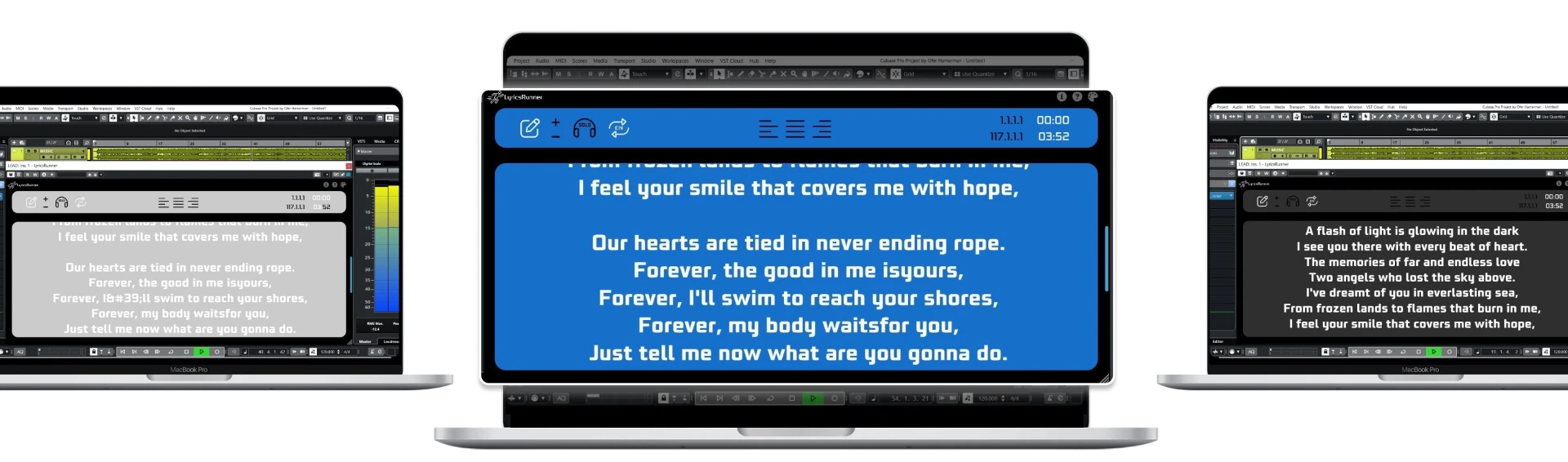
The words scroll where the singer is already looking, driven by the playhead, so nobody scrolls anything. It's the only option on this list that removes a task instead of moving it around. That's why it's the fix that sticks.
Why DAW-synced beats "a screen with lyrics on it"
This is the part people miss. Having lyrics visible is not the win. Having lyrics that move themselves, in time, is the win. The difference is whether the singer has to spend attention on the display.
- Playhead-driven scrolling means the position is always right, including after you loop back or punch in at bar 41.
- You get pre-roll for free — the next line is already on screen before it's needed, which is what breath planning actually requires.
- Nobody touches anything mid-take. No swipe, no tap, no reaching out of mic position.
- Settings live with the project, so the setup you built at 2am is still there next week.
That's the whole design idea behind LyricsRunnerVST: load it as a VST3 on any track, paste the lyrics, and the words follow the timeline in Cubase, Logic Pro, Ableton Live, Pro Tools, FL Studio, Studio One, Reaper or Cakewalk. Resize the window, put it on a second screen facing the booth, and the singer just sings.
A practical session recipe
If you want to stop losing takes to lyric blanks, do these in order. It takes about ten minutes once.
- Get the lyrics into the DAW, not onto a piece of paper. One source of truth, live-editable when a line changes at 1am.
- Size the type so it's readable from mic position, not from the desk. If the singer squints, they look down, and if they look down your top end changes.
- Put the display where their eyeline already is — second screen or a monitor turned toward the booth. Never below the mic.
- Set the scroll so the next line lands roughly a bar early. Reading exactly on the beat is too late for breath.
- Give punch-ins two bars of runway. You're not being generous, you're restoring the chain.
- Save it into the project template. Do it once, never think about it again.
It's not just recording
The same math shows up live, and worse. On stage you've added crowd, monitors, moving lights and gear that might betray you — and the cost of blanking is public. Anyone running backing tracks out of Ableton Live already has a timeline going; putting the lyrics on that timeline is the cheapest confidence upgrade in the rig. Same for worship teams, wedding and cover bands playing eighty songs they don't own, and solo loopers who are already juggling a pedalboard.
And it goes past singing. Voiceover, dubbing, podcast reads, YouTube scripts — anything where you perform text against a timeline hits the identical bandwidth wall.
What to expect realistically
This isn't magic and it won't make anyone sing better. What it does is give back the capacity that lyric retrieval was eating, so the singer can spend it on tone and timing instead. In practice that shows up as fewer stops per pass, cleaner full takes, and less comping later — because you're stitching together takes that failed for musical reasons rather than because somebody said "wait, what's the next line."
It also changes the room's mood, which is underrated. A singer who never gets caught out stays confident, and confident takes are better takes. That part you can hear.
FAQ
Is using a teleprompter cheating?
Broadcast has used prompters for seventy years and nobody thinks the news is fake. Touring artists run lyrics on wedge monitors. The audience hears the performance, not your preparation.
Won't reading make the vocal sound stiff?
Only if you're reading late. Scrolling that stays a bar ahead lets you glance rather than read, which is exactly how prompters work for presenters. Set the lead time properly and it disappears.
Does it work if the tempo changes?
Because the scroll follows the playhead rather than a stopwatch, it tracks the project timeline — including loops, jumps and punch-ins.
Do I need a second screen?
No, but it's the single biggest improvement for tracking sessions, because it puts the words at mic-position eyeline instead of down at the desk.
The takeaway
Forgetting lyrics in the booth isn't a discipline problem, it's an attention budget problem, and you can't fix a budget problem by trying harder. You fix it by removing a line item. Take retrieval off the singer's plate, put the words on the timeline, and let them spend everything they've got on the actual performance.
Try it yourself
Ready to transform your sessions?
Drop your email — we'll send the 14-day trial download link to your inbox. No credit card.
- 30-day money-back guarantee
- Instant download
- Works in every major DAW