Teleprompter for Singers: Which Type Actually Works (2026 Guide)
Almost every teleprompter on the market was built for people who speak, not people who sing. That single fact explains most of the frustration singers have with them: speech runs at a fairly constant rate, and music absolutely does not.
1. Phone teleprompter apps
Free or cheap, always in your pocket, and fine for memorising a lyric on a train. In a session they're the worst option: the screen is small, it's below eye level so your posture and throat suffer, notifications interrupt, and the fixed scroll speed drifts within a verse.
2. Tablet on a mic stand
A real improvement — bigger text, correct eyeline with a decent clamp, and usable on stage. Still timer-based, still needs someone to tap or swipe when the music breathes. Good for live sets with a fixed arrangement.
3. Camera beam-splitter rigs
The broadcast standard: glass in front of the lens reflects a mirrored screen so you read while looking down the barrel. Excellent for music videos and to-camera content, irrelevant for a recording booth, and expensive.
4. Dedicated hardware prompters
Robust, remote-controlled, built for conferences and studios. They cost hundreds to thousands and still have no idea what your song is doing — someone has to drive the scroll.
5. DAW plugin teleprompters
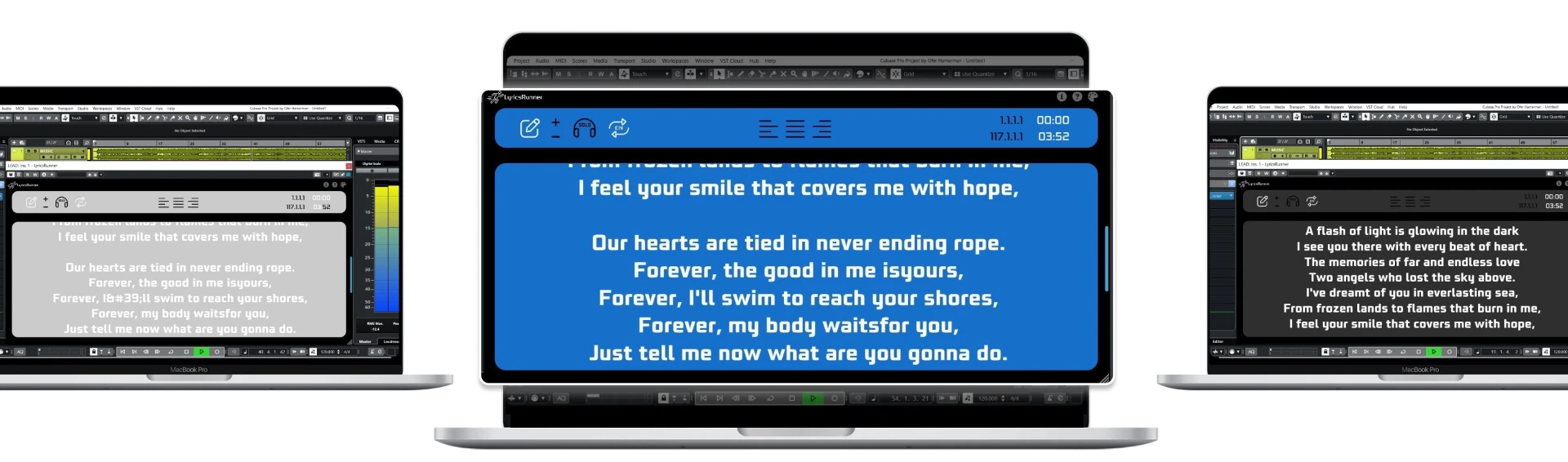
The newest category and the only one designed around music. The prompter runs as a plugin inside your DAW, so it knows the playhead position, the tempo map and the loop state. Nobody drives the scroll — the song does.
Why timeline sync changes the experience
Consider what happens with a fixed-speed prompter across a normal song: a four-bar instrumental intro, a held note at the end of the pre-chorus, a half-time bridge. Each one shifts the text out of alignment, and by the second chorus the singer is guessing. They compensate by reading faster, then slower, which is exactly the kind of divided attention that flattens a performance.
A timeline-synced prompter is immune to all of it. Loop a bar to punch in a word, and the display loops with you. Move a section, and the lyrics move too.
What to look for whichever you choose
- Text large enough to read from the mic position — usually far larger than you'd guess.
- High contrast, and a dark background so the screen isn't a light source in a dark room.
- Positioned at or slightly above eye level to keep the throat open.
- One or two lines of lead-in visible ahead of the current line.
- No notifications, ever.
The practical answer
For rehearsing at home, a free web teleprompter is genuinely enough — we host one, no signup required. For live shows, a tablet on a stand. For recording, use a DAW plugin: LyricsRunnerVST runs as VST3 in Cubase, Logic Pro, Ableton Live, Pro Tools, FL Studio, Studio One, REAPER and Cakewalk, and scrolls in perfect sync with the transport.
Try it yourself
Ready to transform your sessions?
Drop your email — we'll send the 14-day trial download link to your inbox. No credit card.
- 30-day money-back guarantee
- Instant download
- Works in every major DAW