Autoscroll Lyrics in Your DAW: How to Make Song Lyrics Scroll Automatically
If you've ever tried to sing a take while thumbing through a lyrics app on your phone, you know the problem: your eyes and your hands are busy with the wrong job. Autoscroll lyrics solve that — the words move on their own, so you just sing.
The three ways to scroll lyrics automatically
1. A scroll lyrics app on a phone or tablet
Lyrics scrolling apps move text at a fixed speed. They're fine for rehearsal, but the speed isn't tied to your song. Stop the track, punch in at the second chorus, or change tempo, and the app is now in the wrong place.
2. A PDF or text file with auto-scroll
Browsers and PDF readers can auto-scroll too. Same issue: no connection to the session, so every punch-in means finding your spot again.
3. A lyrics VST plugin that follows the playhead
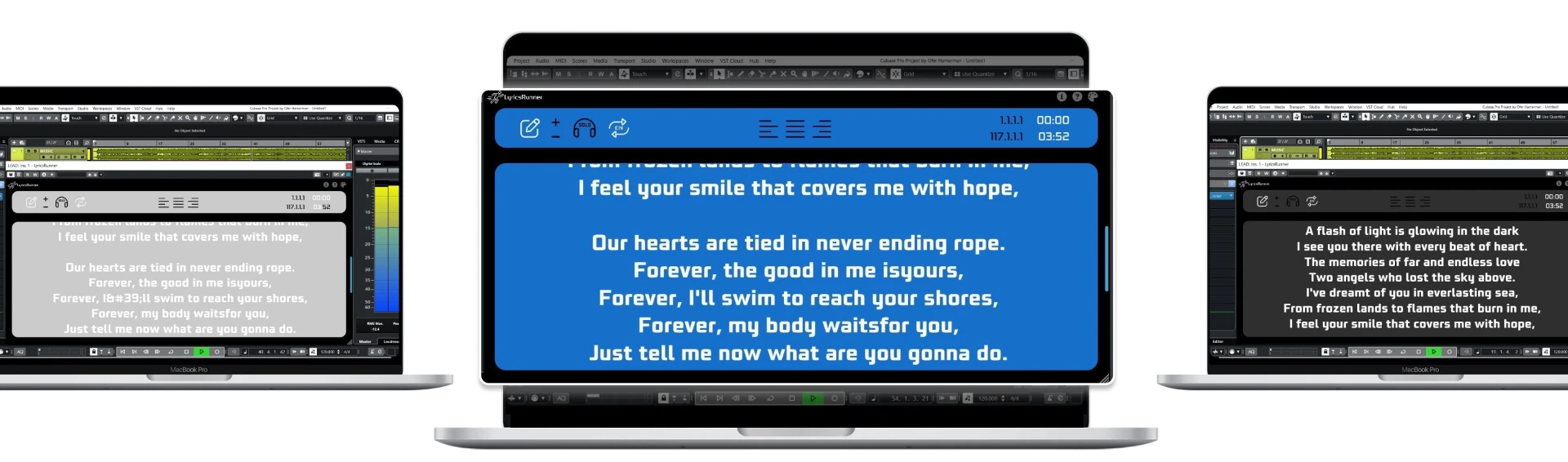
A lyrics VST plugin such as LyricsRunnerVST runs inside your DAW. Because it reads the transport position, the lyric scroller is always on the right line — on playback, after a jump, after a loop. This is real-time lyrics display, not a timer.
How to set up autoscroll lyrics with LyricsRunnerVST
- Insert LyricsRunnerVST on any track (VST3, Windows or macOS).
- Paste the song lyrics into the plugin window.
- Set the start marker where the vocal begins.
- Press play — the lyrics scroll automatically with the song.
- Resize the window or put it on a second screen for the vocalist.
Why it matters on take seven
Every time the singer has to look for their line, focus drops. Keeping the next line in view removes that friction, so you get more usable takes before fatigue sets in.
Try it yourself
Ready to transform your sessions?
Drop your email — we'll send the 14-day trial download link to your inbox. No credit card.
- 30-day money-back guarantee
- Instant download
- Works in every major DAW