Best VST Plugins for Vocals in 2026: A Recording-First Chain
Every vocal plugin roundup describes the same chain: subtractive EQ, de-esser, compressor, saturation, delay, reverb. That chain is fine. It also can't rescue a hesitant take.
So this list splits into two halves: what improves the performance, and what improves the recording after it exists.
Part 1 — Plugins that improve the performance
A teleprompter inside the DAW
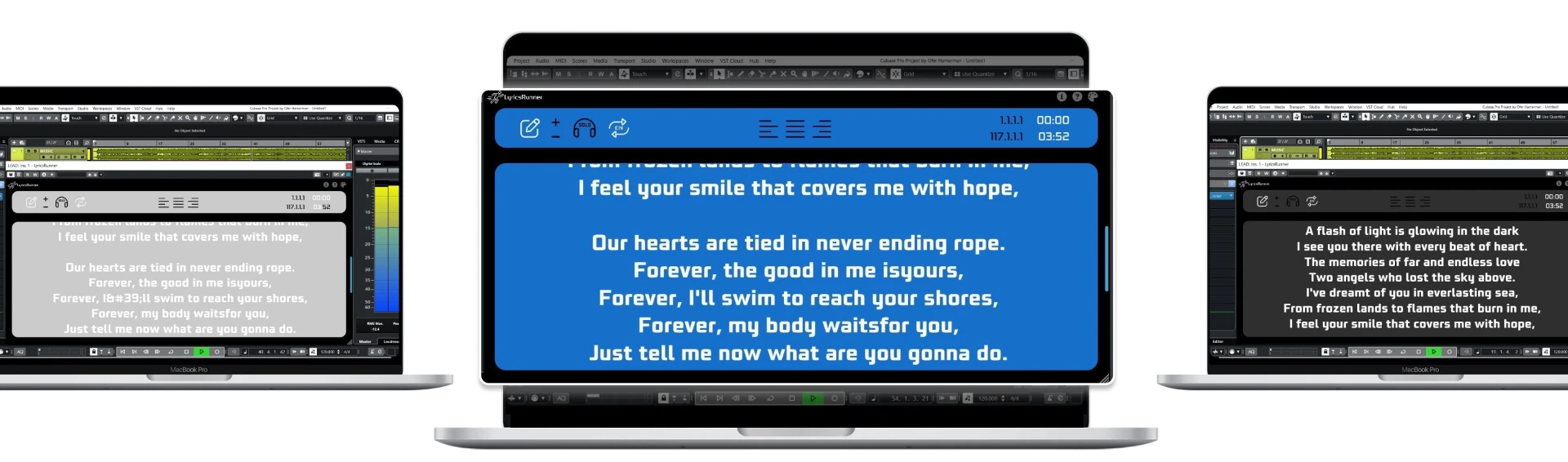
Singers make three kinds of mistakes: pitch, timing and words. Plugins fix the first two. The third is fixed by not making the singer recall lyrics under pressure. A lyrics teleprompter VST like LyricsRunnerVST displays the lyrics in a resizable window and scrolls them in time with the transport, so the next line is always visible a beat before it's needed.
Practical effect: fewer stops, fewer punch-ins, and takes that stay emotionally consistent because the singer never breaks concentration to look at a sheet of paper on a music stand.
Real-time monitoring reverb
A light reverb in the singer's headphones — not printed, monitoring only — reliably produces more committed performances. Any low-latency algorithmic reverb works; the point is that the singer hears themselves flattered, not exposed.
Part 2 — Plugins that improve the recording
Pitch and timing
Melodyne for surgical, per-note work; Auto-Tune or Waves Tune Real-Time when the sound itself is the effect. Use them to finish a good take, not to build a take out of parts.
Dynamics
Two stages beat one: a fast, gentle compressor to catch peaks, then a slower one for level. Free options such as TDR Kotelnikov cover both convincingly.
Tone
Subtractive EQ before additive. Cut the boxy 200–400 Hz range and any harsh resonance in 2–5 kHz before you reach for a high shelf. A de-esser goes after compression, not before.
Space
A short slap delay pushes a vocal forward better than more reverb. Reverb is for depth; delay is for size.
The order that actually matters
- Get the words in front of the singer so they can perform.
- Capture a full, committed take.
- Fix pitch and timing lightly.
- Control dynamics in two gentle stages.
- Shape tone by cutting first.
- Add space last.
Steps two through six are where the plugin money usually goes. Step one is where the session time is usually lost.
Try it yourself
Ready to transform your sessions?
Drop your email — we'll send the 14-day trial download link to your inbox. No credit card.
- 30-day money-back guarantee
- Instant download
- VST3 / AU / CLAP on Mac & Windows