VocaTune Studio: Natural Tuning or Hard Retune — Does It Fit Your Vocals?
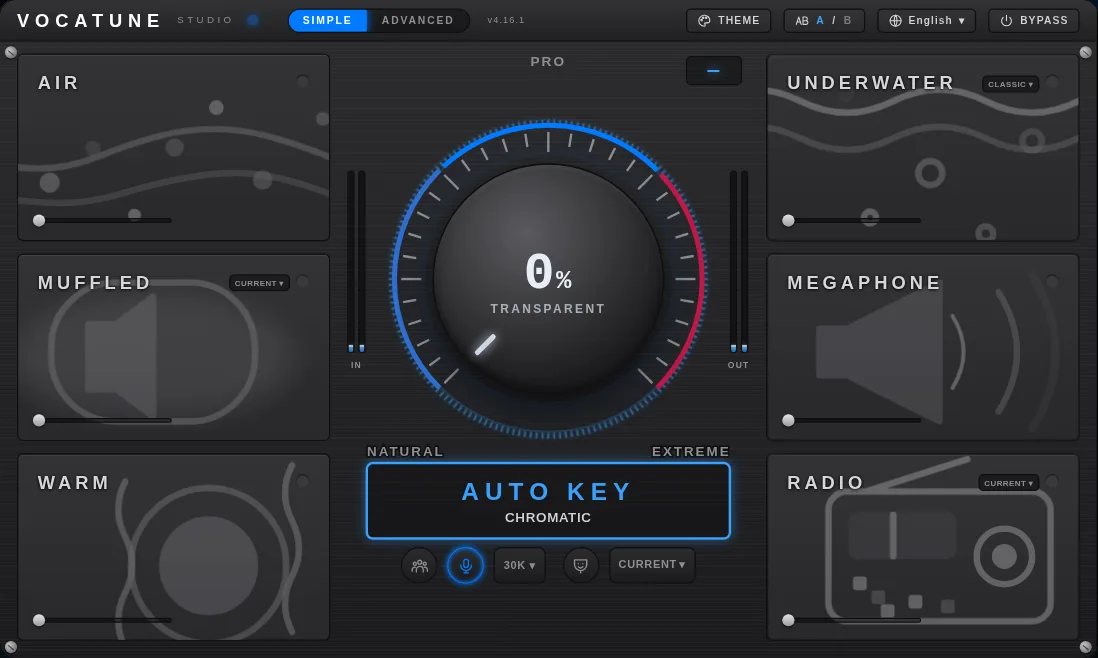
VocaTune Studio is a vocal pitch correction plugin designed to move from transparent tuning to an obvious hard-retune effect using one Amount control. It is aimed at singers and producers who want a quick correction workflow rather than an assumption that every vocal must sound heavily processed.
The Amount control and key detection
The documented Amount zones are Natural at 0–50%, Pro at 50–95%, and Extreme at 95–100%, where retuning becomes instant. Start with a low amount and listen to a phrase containing slides, vibrato and held notes. Increase it only as far as your arrangement needs. AUTO KEY detects the key and scale, but you should check that the detected musical context matches your song rather than assuming automatic detection is always right.
Who it suits
- A singer who wants correction while retaining intentional expression.
- A producer who wants to compare natural correction with a deliberately hard vocal effect.
- Someone who values Simple and Advanced views rather than beginning with a detailed manual editing workflow.
Monitoring and the web app
The product lists a LIVE mode with approximately 8.8 ms latency. That is the published plugin figure, not your complete microphone-to-headphone delay: audio interface settings, buffer size and other processing also matter. Test monitoring on your own system before relying on it for a performance. The separate VocaTune web app accepts a vocal upload, lets you hear the result and offers a WAV download; its offer is distinct from a desktop plugin license.
What not to assume
Pitch correction does not remove breaths, sibilance or plosives just because it makes notes more accurate. A tuning processor is not a substitute for every vocal-preparation stage. This guide does not establish note-by-note editing, polyphonic correction or a specific formant workflow beyond the documented product features. If one of those is essential, ask before buying.
A useful listening test
Compare bypass and processed audio at similar levels. Listen to note transitions and vibrato first, then test the hard effect on a phrase where you actually want it. Compare the key settings and Amount before judging the sound. The catalog lists VST3 and AU on macOS and VST3 on Windows; verify current installer and trial availability. Six visual themes and 15 interface languages can improve comfort, but your recording and monitoring test should determine the purchase.
Open VocaTune Studio or visit vocatune.com for the current product offer.
Try it yourself
Ready to transform your sessions?
Drop your email — we'll send the 14-day trial download link to your inbox. No credit card.
- 30-day money-back guarantee
- Instant download
- VST3 / AU / CLAP on Mac & Windows