Lyrics Prompter for Stage: A Rehearsal-to-Show Checklist
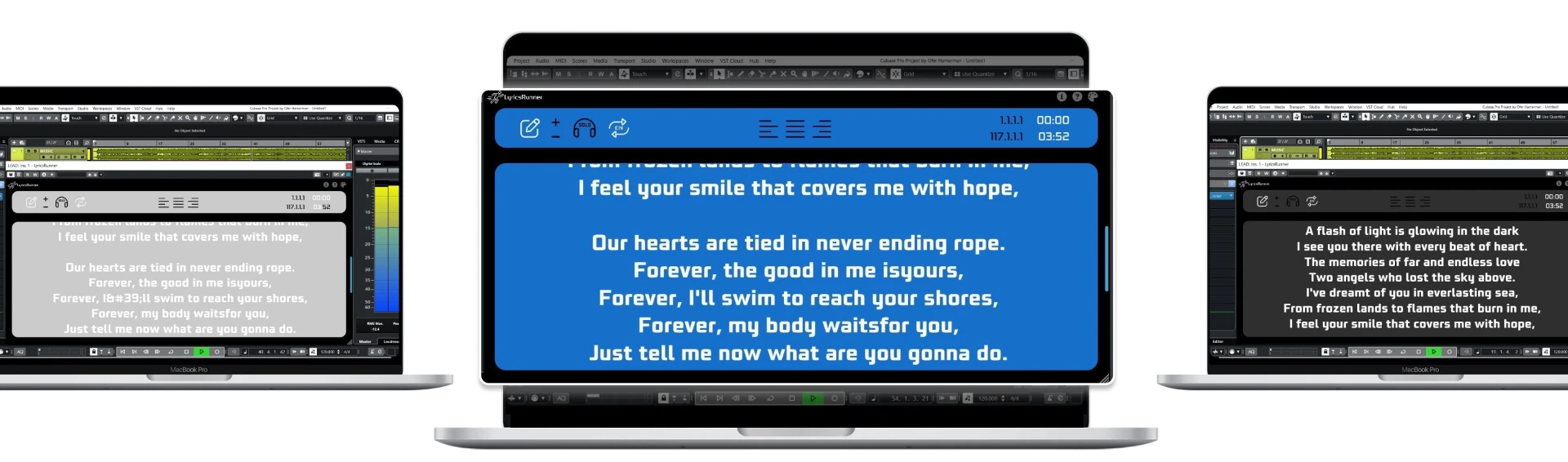
A lyrics prompter for stage should show the right words at the right point in the performance, not just scroll a text file. If your show already runs from a DAW timeline, prepare the lyric display against that same arrangement. LyricsRunnerVST is software for a compatible DAW, not a stage monitor or a standalone mobile app.
Start with the arrangement that will actually be played
A studio master is not always a live arrangement. An extra introduction, an extended solo or a shortened final chorus can make an otherwise accurate lyric prompt feel wrong. Make a rehearsal copy of the show project and identify every section that differs from the released song. Prepare the lyric text from that version rather than from memory.
Keep repeated sections in their actual running order. A note saying “chorus again” might be enough for the producer, but it makes the singer retrieve words at precisely the moment the screen is supposed to help. Write the repeated words out and label sections clearly. Include a short visual cue for instrumental breaks so the singer knows the empty space is intentional.
Treat the count-in as part of the prompt
The first line needs to be visible before the first sung syllable. Start rehearsals from the same count-in position you intend to use at the show. Adjust the display so it gives useful preparation time without racing through the opening words. Then repeat the test from the middle of the song, where a rehearsal restart is likely to happen.
A DAW-linked display follows the transport reference; that is different from software that listens to a singer's voice. Do not assume it will wait automatically if the singer holds a phrase or the band adds an unplanned section. If the performance is not following a fixed timeline, decide who will control playback or choose a prompting workflow suited to flexible song order.
Check the screen from the performer's position
The useful test is not whether text looks attractive on the operator's laptop. Stand where the singer will stand, at the expected distance, and read the densest verse while singing. Increase text size, reduce visual clutter and check contrast under the actual lighting. Make sure the display does not require the performer to turn away from the microphone or audience.
LyricsRunnerVST can show its window on a second display connected to the computer. The screen, connection and physical placement are separate parts of your setup. It does not include a wedge monitor, wireless tablet connection or stage hardware. Secure cables and keep the screen out of walking paths; ask venue staff about safe placement instead of improvising during the show.
Rehearse the failure cases, not only the full song
Test stop, restart and locate operations at the chorus and final verse. Reopen the saved project and confirm that the lyric text and display settings return. Run the session with the same audio devices, computer and display arrangement you plan to use live. A successful rehearsal on a different machine does not establish that the show system is ready.
Keep an approved plain-text lyric sheet or printed set nearby as a fallback. Record which project version belongs to the current setlist and give the operator one authoritative copy. A dependable workflow has an obvious recovery path when a screen disconnects, not just a polished first run.
Choose the software after the rehearsal test
If you need general setlist management, inspect the documented workflow of LivePrompter alongside your requirements. If the DAW timeline is your reference, check LyricsRunnerVST compatibility and try the 14-day trial. The lifetime license is $49, one payment; stage hardware is separate. For display placement, continue with the lyrics monitor readability guide.
Try it yourself
Ready to transform your sessions?
Drop your email — we'll send the 14-day trial download link to your inbox. No credit card.
- 30-day money-back guarantee
- Instant download
- VST3 / AU / CLAP on Mac & Windows